Mudroom Built-In Charging Stations for Phones and Tablets
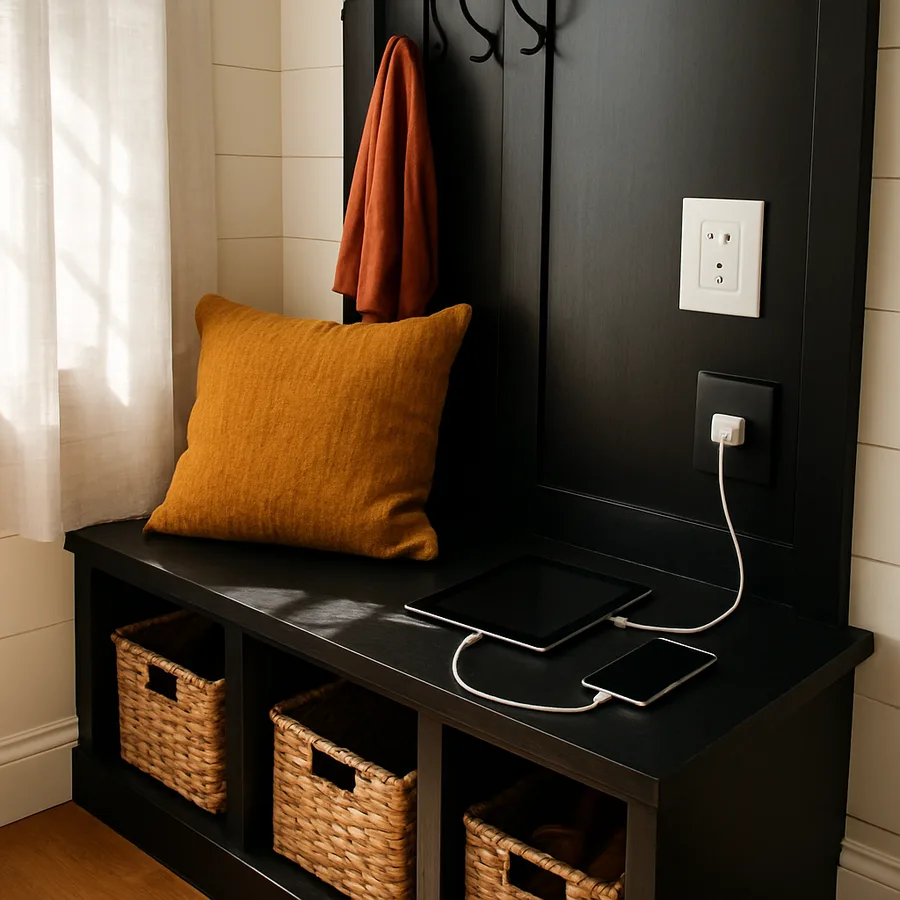
The mudroom has quietly become the most overworked room in the modern American home. It absorbs winter coats, sandy beach bags, soccer cleats, dog leashes, and the constant migration of phones, tablets, and earbuds that everyone in the family insists they cannot live without. A thoughtfully designed built-in charging station turns that chaos into a calm, single-purpose docking zone where every device has a labeled cubby, a dedicated outlet, and a clean cord run that hides behind the millwork. Done well, it eliminates the kitchen-counter cable nest that plagues so many households and gives kids and adults alike a predictable place to drop devices the moment they walk through the door.
According to a Pew Research Center estimate, roughly 97 percent of American adults now own a smartphone, and the average household maintains several tablets, smartwatches, and Bluetooth accessories simultaneously. That is a lot of plugs competing for a finite number of outlets, and most older mudrooms were never wired with this many devices in mind. The good news is that integrating safe, code-compliant charging into a mudroom bench, locker, or boot wall is well within the reach of a homeowner working with a competent electrician and a thoughtful layout. Have you ever counted how many chargers your family has plugged in across the whole house at once? You may be surprised by the answer.
Why a Dedicated Charging Zone Belongs in the Mudroom
The mudroom sits at the threshold between the outdoors and the heart of the home, which makes it the single most logical place to capture devices before they migrate to bedrooms, sofas, and dinner tables. Decision fatigue is real: if a phone has no obvious resting place, it ends up wherever the user happens to stop, which is usually the kitchen counter where food is being prepared. A built-in mudroom dock breaks that pattern by giving devices a default home that is both visible and out of the way of everyday cooking and homework surfaces.
Families with school-aged children benefit most. Pediatricians at the American Academy of Pediatrics have long recommended that screen devices live outside bedrooms, especially overnight, to support healthier sleep. A locking or simply visible mudroom station turns that recommendation into a daily ritual rather than an enforcement battle. Parents drop their phones too, which models the behavior children are being asked to follow. Over weeks and months, the room earns its keep by reducing the number of devices floating through the house at any given moment.
There is also a security and emergency angle. Keeping one or two phones at a known, accessible spot near the most-used entry door means that in a fire, medical event, or weather emergency, the family knows exactly where to grab a device on the way out. A small dry-erase strip above the dock for guest Wi-Fi credentials, the home address, and emergency numbers turns the station into a low-effort safety hub. Could your household name, without searching, where each phone is right now? If not, the mudroom is the right place to start fixing that.
Smart Layouts: Bench, Locker, Drawer, and Wall Niche
There is no single correct layout for a mudroom charging zone, but four patterns cover roughly ninety percent of real-world projects. The open bench cubby places small charging shelves directly above or beside the seat, often inside the same vertical bay used for backpacks. It is the cheapest to build and the easiest to retrofit, since cabinet-grade plywood and a pre-built outlet box are usually all you need. The downside is visibility: cords and devices are always on display, so cable management has to be excellent.
The locker style tucks a charging cubby inside each family member's tall locker, often behind a small hinged door at chest height. Each person gets a private dock, which dramatically reduces sibling conflict. This works beautifully in homes with three or more children. A dedicated drawer with a power strip mounted to the back wall is the cleanest aesthetic option; everything disappears when the drawer closes, and a felt liner keeps screens from scratching. Finally, a wall niche carved into a recessed bay between studs, with a single shelf and an integrated outlet, suits narrow mudrooms where every inch matters.
When choosing between these, think about who actually uses the room and how. A two-adult household might love the drawer for its calm, hidden look. A family of five with athletes constantly racing in and out probably needs the locker approach so each kid has a clearly assigned spot. The National Kitchen and Bath Association publishes general planning guidelines that emphasize matching storage type to user behavior rather than to magazine aesthetics, and that principle applies as cleanly to mudrooms as it does to kitchens. Read more about NKBA's design framework at the National Kitchen and Bath Association site.
Electrical Planning, Code, and Outlet Placement
This is the section to read carefully, because it is the section most homeowners are tempted to skip. Mudroom charging stations sit close to wet jackets, snow boots, and sometimes pet bowls, all of which raise the moisture profile of the room. Although most mudrooms are not technically classified as wet locations, you should still treat outlets here with extra respect. Many local jurisdictions, following the National Electrical Code, require tamper-resistant receptacles in living areas, and a growing number of inspectors expect GFCI protection wherever water exposure is plausible. Confirm your local amendments with your municipal building department before designing the station.
For a typical built-in dock, plan a single dedicated 15- or 20-amp circuit that serves only the charging zone and perhaps a nearby light. Drawing chargers off the same circuit as a freezer, washer, or kitchen small-appliance loop is asking for nuisance trips. Inside the millwork, mount an in-cabinet receptacle box, ideally one with built-in USB-A and USB-C ports rated for your charging needs. Modern hybrid receptacles can deliver up to 60 watts of USB-C power, enough for tablets and even some laptops, while still offering two standard plug slots for legacy bricks. The NFPA NEC standard page is the canonical reference for the underlying requirements, although your electrician should be the person actually interpreting them.
Cable runs should travel through grommets that match your cabinet finish, not through ragged drilled holes. Provide at least one open knockout between each cubby and the outlet bay so users can swap cables without a screwdriver. Always hire a licensed electrician for any new circuit, and ask for a permit even if your area technically does not require one for low-voltage rough-ins, because the inspection record protects your homeowner's insurance and your eventual resale.
Cable Management That Survives Daily Use
The single biggest predictor of whether a charging station will still look good a year after installation is the quality of its cable management. Loose cords get yanked, kinked, and eventually snapped at the connector, which is exactly when you discover that no replacement is in the drawer. Build the system to assume that cables will be tugged on dozens of times a week.
Start by anchoring each cable. A small spring-loaded cable clip mounted to the underside of each shelf holds the connector end at a consistent height, so a phone slides onto it without fishing under a dust ruffle of wires. Run the slack down through a grommet into a hidden channel behind the back panel, where a fixed power strip lives. Use braided cables rather than the soft rubber kind that came in the box, since braided sleeves resist abrasion against wood edges and last roughly two to three times longer in our experience. Label every cable at both ends with a small heat-shrink tag listing the device it serves.
Group cables by user when possible, so when one child changes phones, only their two-cable run needs swapping. Leave roughly six inches of service slack coiled inside the back channel, never pulled taut, because cables that stretch tight against a corner will fail at the strain relief within months. Finally, install a small soft-close kickplate or a hinged maintenance panel in the back of the cabinet that lets you reach the power strip without unloading the entire bench. Have you ever tried to replace a single bad cable in a built-in and ended up disassembling the whole bay? That panel exists to keep that from happening to you.
Materials, Finishes, and the Quiet Look of Premium Millwork
Charging stations live in a humid, dusty, salty corner of the house, so material choice matters more than it does in a living room. Cabinet-grade plywood with a hardwood face frame outperforms MDF in every relevant metric: moisture stability, screw retention, and longevity at the edges where boots scuff and bags drop. Solid wood drawer fronts in white oak, walnut, or rift-cut maple bring warmth, while painted poplar in a deep, slightly desaturated color, such as a soft black, navy, or olive, hides scuffs from cleats and dog leashes far better than pure white.
For the charging surface itself, a thin slab of leather, cork, or microsuede protects screens from micro-scratches and gives a soft, hospitality-style finish. Avoid glossy laminates that show every fingerprint and high-grit textures that catch on charging ports. Hardware should be matte, low-profile, and mounted with extra blocking, because any handle in a mudroom will eventually be grabbed mid-stride by someone carrying groceries. Consider integrated finger-pulls along the top edge of doors as an even simpler, more durable solution.
Lighting is what separates a functional cubby from a station that feels intentional. A continuous warm-white LED strip mounted just inside the top of each charging bay, dimmed to roughly thirty percent at night, illuminates the dock without lighting up the whole room. Tie the strip to a motion sensor or a low-voltage timer so it switches off after midnight. Designers affiliated with the American Society of Interior Designers consistently emphasize layered lighting, and a charging niche is a clean place to deploy that principle on a small budget.
Family Workflow, Labels, and the Daily Drop Habit
A built-in only earns its cost when it changes daily behavior, and behavior change requires the design to support a simple, repeatable workflow. Start by labeling each cubby, ideally with a small engraved or laser-etched plaque rather than a paper label that will peel within a season. Use first names for kids and a simple icon set for shared devices like the family tablet, the work phone, or the spare emergency phone. Pair the labels with a clearly visible house calendar or a chalk strip just above the dock so the room handles two jobs at once.
Establish a single phrase the household uses, such as "phones in the mudroom," at predictable transition points: dinner, homework, bedtime. Consistency is more important than enforcement; over a few weeks the verbal cue becomes muscle memory. Adults need to participate visibly. If a parent's phone never lands in the dock, no child will keep theirs there. For homes with teenagers, a small lockable drawer dedicated to overnight phone storage can be useful, and several manufacturers now build keyed inserts specifically for this purpose.
Add small touches that make the dock the most attractive place to leave a device. A wireless charging pad for the most-used phone removes even the cable-fumbling step. A shared bowl for AirPods, smartwatches, and key fobs prevents loose accessories from migrating. A Sharpie tied to a string near the calendar invites the kind of casual notes that keep the family informed. Builders affiliated with the National Association of Home Builders often note that the rooms families actually use are the ones with this kind of daily-touch detail rather than the ones that photograph best.
Conclusion: Build Once, Charge Calmly for a Decade
A mudroom charging station is one of those small architectural moves that pays back daily, in a way that more glamorous renovations rarely do. It catches devices at the threshold, protects sleep and family time, gives every phone and tablet a respected home, and quietly removes the kitchen-counter cord nest that frustrates almost every household I have ever visited. The build itself is modest in scope: a few square feet of millwork, one dedicated circuit, a thoughtful set of cubbies, and a cable plan that assumes daily use rather than magazine photography.
Think of the project as three intertwined decisions. First, layout, where you choose between bench, locker, drawer, or niche based on who lives in the home and how chaotic mornings actually feel. Second, electrical, where a licensed electrician, a tamper-resistant outlet, and properly braided cables keep the system safe and durable. Third, ritual, where labels, a wireless pad, and a single shared phrase turn the dock into a habit rather than a feature. Skip any of the three and the station drifts back into chaos within months.
If you are planning a mudroom refresh this year, start by sketching the existing space, counting the devices your household actually charges in a week, and then designing the dock around that real number rather than an aspirational one. Talk to your electrician early so the rough-in lines up with cabinet construction. Consider how the room will feel at six in the morning, in coats and backpacks, not just at noon in catalog light. The goal is calm, not Instagram, and calm is achievable on almost any budget when the millwork, the wiring, and the family routine all point at the same dock.
Ready to take the next step? Sketch your mudroom on a single sheet of graph paper this weekend, mark every device that comes through that door in a typical week, and bring both to your designer or electrician. That conversation, more than any product purchase, is what turns a charging-cord nightmare into a built-in that quietly works for a decade.
More Articles You May Like



Comments
Post a Comment