Cloffice Closet Office Conversion With Folding Desk and Light
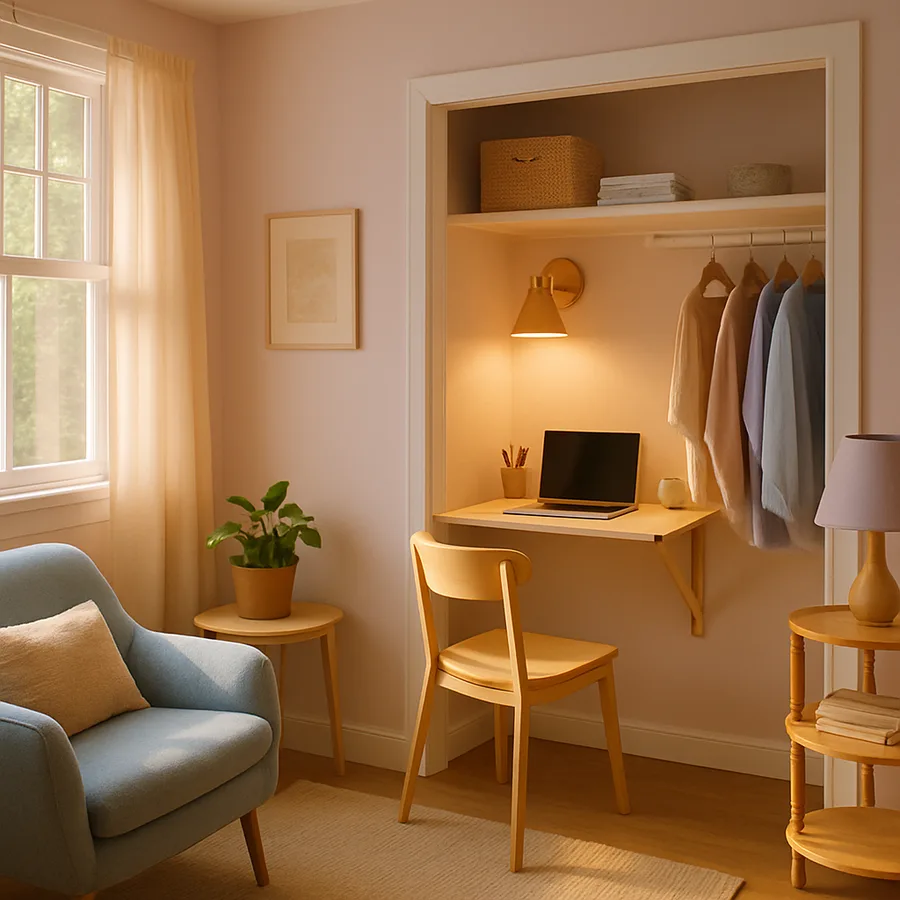
The cloffice sits at the intersection of two real housing pressures. American homes are getting more remote workers, and American closets are often badly used. Repurposing roughly nine to fifteen square feet of underused closet into a fully functioning home office is one of the highest-ROI moves a homeowner or renter can make, particularly in apartments and starter homes that lack a true den. Done well, the cloffice closes behind a pair of doors at five o'clock, which is exactly the kind of physical boundary that hybrid workers have been begging for.
According to a Stanford economics study cited widely in the work-from-home literature, roughly 40 percent of American work hours are now performed remotely at least part of the week, and the trend has stabilized rather than reversed. That is a lot of laptops looking for a home that is not the kitchen counter or the dining room. A closet, especially a reach-in or a narrow walk-in, can absorb that work zone with surprisingly little carpentry. Have you ever taken honest stock of what is actually in your guest-room or hallway closet? In most homes, the answer is "items the family no longer uses," which is precisely the inventory a cloffice deserves to displace.
Choosing the Right Closet for Conversion
Not every closet is a good cloffice candidate. The four variables that matter are depth, width, access to power, and ventilation. A reach-in closet at least 24 inches deep and 36 inches wide can host a folding desk and a slim chair. Below that footprint, the user will hit their knees on the back wall every time they sit down. Walk-in closets give more room but often have less ideal lighting and are sometimes farther from network drops, so they require more wiring planning.
Power is the variable most homeowners underestimate. A closet rarely has more than a single overhead light circuit, and that circuit is almost never code-friendly for plugging in a laptop charger, a monitor, and a printer. Plan early for an electrician to add a dedicated 15- or 20-amp outlet circuit on the back wall of the closet, ideally with a built-in USB-C hybrid receptacle. Many local jurisdictions follow the National Electrical Code in requiring tamper-resistant receptacles in living areas, and a cloffice qualifies. The NFPA NEC standard page is the canonical reference for those rules.
Ventilation matters because closets are unconditioned dead-air spaces. Sitting in one for eight hours with the doors closed quickly becomes uncomfortable. Plan for either a small undercut at the bottom of the closet door, a louvered upper door panel, or a quiet inline fan that pulls air from an adjacent return. Skipping this step is the single most common reason new clofficers stop using their conversion within a few months. Have you ever stepped into a closet on a humid day and felt the temperature spike? That is the air your work zone needs to handle.
The Folding Desk: Three Approaches That Actually Work
The folding desk is the structural heart of most cloffice conversions because it lets the closet remain useful for storage when the office is not in use. Three approaches dominate. The wall-hinged drop-leaf is a flat panel mounted to the back wall by a piano hinge, with one or two folding brackets supporting the front edge. It folds up flat when closed and locks against a magnetic catch. This is the cleanest visual but the heaviest engineering burden, since the wall studs need to be located precisely.
The extending-arm or wall-bed-style system uses a counter-balanced mechanism that pulls the desk forward and tilts it down to horizontal in a single motion. These mechanisms are sold by several office and Murphy bed manufacturers and rated for substantial loads. They cost more, but they accept heavier items, like an external monitor, that the simple drop-leaf cannot support overnight. The fixed-but-shallow desk skips folding entirely, mounting a 14- to 16-inch deep ledge permanently to the back wall and leaving 8 to 10 inches of standoff for the chair. This is the simplest carpentry and works well in deeper walk-ins.
Whichever approach you choose, the surface should sit at desk height, 29 to 30 inches, not counter height, because typing at counter height produces shoulder pain within weeks. Mount the desk to studs, not just to drywall, and rate the brackets at least double the expected load. A 36-inch wide drop-leaf can easily see 50 pounds of laptop, monitor arm, books, and elbows pressing down, especially when the user gets frustrated and leans hard into the keyboard. Plan accordingly.
Layered Lighting Inside a Small Box
Lighting is what separates a cloffice that feels like a real workspace from one that feels like a punishment. Most closets have a single bare bulb on a pull chain or a recessed can with an unflattering color temperature. Replace that fixture entirely. The minimum effective lighting plan has three layers: a primary overhead, a focused task light on the desk, and an indirect accent that softens the room.
For the overhead, install a slim flush-mount LED with a color temperature around 3500 to 4000 Kelvin, which reads as crisp daylight without going blue. A dimmable driver is worth the extra cost; you will want to drop the brightness for video calls and raise it for paperwork. Aim for roughly 60 to 80 lumens per square foot at desk height, which a small ten-square-foot closet will hit comfortably with a single 1,000-lumen fixture. The Illuminating Engineering Society publishes recommended lumen levels for office work, and matching that target keeps eye strain manageable across a long day.
The task light is non-negotiable. A small swing-arm desk lamp mounted to the back wall, or a slim under-shelf LED bar at the front edge of an above-desk shelf, throws light directly onto the keyboard and any paperwork. Position it so the user's body does not cast a shadow on whatever they are reading. Finally, an indirect accent, such as a thin LED strip along the underside of an upper shelf or behind a fabric backdrop, removes the cave-like feeling that small closets often have. Layered light, championed by designers affiliated with the American Society of Interior Designers, transforms small spaces more reliably than almost any other single move.
Ergonomics, Chair Choice, and the Knee-Bumping Problem
Working in a closet sounds cramped because it can be. The fix is honest measurement up front. The typical user needs roughly 20 inches of knee clearance below the desk, plus another 16 to 18 inches behind the chair to stand up without sliding sideways. That math means a desk surface at 29 inches high, mounted on a wall in a closet 24 inches deep, gives the user about four inches of usable knee clearance, which is not enough. Either the closet must be deeper or the chair must be slim and pulled forward as needed.
For chairs, the choices fall into three buckets. A standard task chair with arms is the most ergonomically supportive but the bulkiest. An armless task chair shaves roughly five inches of width and tucks under the desk when needed. A simple wood side chair with a cushion gives the cleanest visual but offers limited lumbar support; it is fine for short stints and rough on full-day shifts. Match the chair to the work pattern. The OSHA ergonomics guidelines, available at OSHA's ergonomics resource page, emphasize lumbar support, neutral wrist posture, and a screen at eye level, and those three principles apply just as cleanly inside a closet as inside a corner office.
The knee-bumping problem deserves a final word. If the closet is too shallow for full knee clearance, mount the desk on a slight forward angle of roughly two degrees. The barely visible tilt feels normal in use but recovers a critical inch or two of knee room. Alternatively, build a small recessed kick area into the bottom of the back wall, which adds three to four inches of toe space without changing the closet footprint. Have you tried sitting in your prospective cloffice with a tape measure before committing? That fifteen-minute test prevents most knee-bumping regrets.
Backdrop, Acoustics, and the Video-Call Camera Frame
If you take video calls from your cloffice, the back wall behind your head becomes part of your professional image. Plan it deliberately. The cleanest move is a removable peel-and-stick wallpaper in a calm pattern or solid color, which transforms an industrial-looking closet into a thoughtfully designed background in under an hour. Stay away from busy florals and high-contrast geometrics, which compress poorly on video and distract participants from the speaker.
Above or behind the desk, hang one or two small framed prints, a slim shelf with two or three personal objects, or a soft fabric panel. The goal is depth, not clutter; cameras read flat backgrounds as boring and overstuffed shelves as chaotic. A 3:1 ratio between negative space and styled objects is a reliable starting point. Position the camera so the user's eyes land roughly one third from the top of the frame, which means mounting the laptop on a riser and the user sitting up straight rather than slouching.
Acoustically, closets are surprisingly forgiving because the clothing on hangers, when present, dampens echo. A bare cloffice with hard walls and a hard desk often sounds harsh on calls. Add a small upholstered bulletin board, a fabric panel behind the chair, or even a small rug under the chair to soften the room. Sound absorption at the speaker's mouth is more important than at the listener's microphone, and a single soft surface within four feet of the user usually fixes the worst of the room's resonance.
Storage, Cable Routing, and Closing the Door at 5 P.M.
The cloffice still needs to function as storage, especially in homes where it is replacing a coat closet or a guest-room closet. Plan storage above and below the desk so the working zone remains clear. Above the desk, shallow shelves at 12 inches deep hold books, a printer, and a small basket for office supplies. Below the desk, a single drawer on full-extension slides handles paperwork, while the floor space accepts a slim filing cabinet on casters that rolls aside when the user sits down.
For the rest of the closet, decide what you are keeping. A common pattern is a half-and-half conversion, where the left half remains a hanging-clothes zone and the right half becomes the cloffice. Use a vertical divider to keep the two zones from spilling into each other. If the closet was a coat closet, displace those coats elsewhere, ideally to a mudroom, before construction starts. Builders associated with the National Association of Home Builders often note that closet conversions fail when storage is added without subtracting; you cannot fit ten pounds of stuff into a five-pound closet just because you want a desk.
Cable routing should plan for a single drop-down channel from the underside of the upper shelf to the desk surface, plus a hidden run from the desk to the in-wall outlet box. Use a small grommet and a Velcro cable tie at every transition point. Most importantly, design a way to close the doors at five o'clock. Bifold doors, a curtain on a slim track, or a pair of slab doors all signal the end of the workday, which has measurable benefits for sleep and for evening family time. Have you ever found yourself answering email from your couch because there was nowhere to put the laptop down? The closing doors solve that.
Conclusion: The Smallest Renovation That Restructures a Workday
The cloffice is the rare renovation that costs little, takes a weekend or two of work, and changes the rhythm of an entire household. It pulls the laptop off the kitchen table, gives the remote worker a real beginning and end to the workday, and respects the existing footprint of homes that simply do not have a spare room. The folding desk preserves the closet's storage capacity. The layered lighting makes the small space feel intentional. The wallpapered backdrop turns video calls from awkward into professional.
The conversion succeeds when four ingredients line up. The closet is large enough for honest knee clearance, a licensed electrician adds a dedicated outlet circuit with code-compliant receptacles, the lighting layers properly across overhead, task, and accent, and the storage plan respects the inventory the closet must still house. Skip any of those four and the cloffice drifts into a glorified shelf within a few months.
One final encouragement. The cloffice is not just a small home office; it is a piece of household infrastructure. It tells the family that work has a place, that the place closes at the end of the day, and that the rest of the home does not need to absorb the laptop's daily presence. That cultural signal often matters more than any single design decision inside the closet itself.
This week's action: measure the depth, width, and door swing of every closet in your home, identify the one that comes closest to a 24-by-36-inch usable interior, and walk through it with a friend pretending to take a video call. The one that feels best after that test, even if it needs an electrician and a fresh coat of paint, is your cloffice. Sketch the folding-desk geometry, call your electrician, and start measuring for the bifold doors. The work that comes next will fit in a calmer corner of your home for years.
More Articles You May Like



Comments
Post a Comment