Loft Space Office Setups Under Low Angled Ceilings
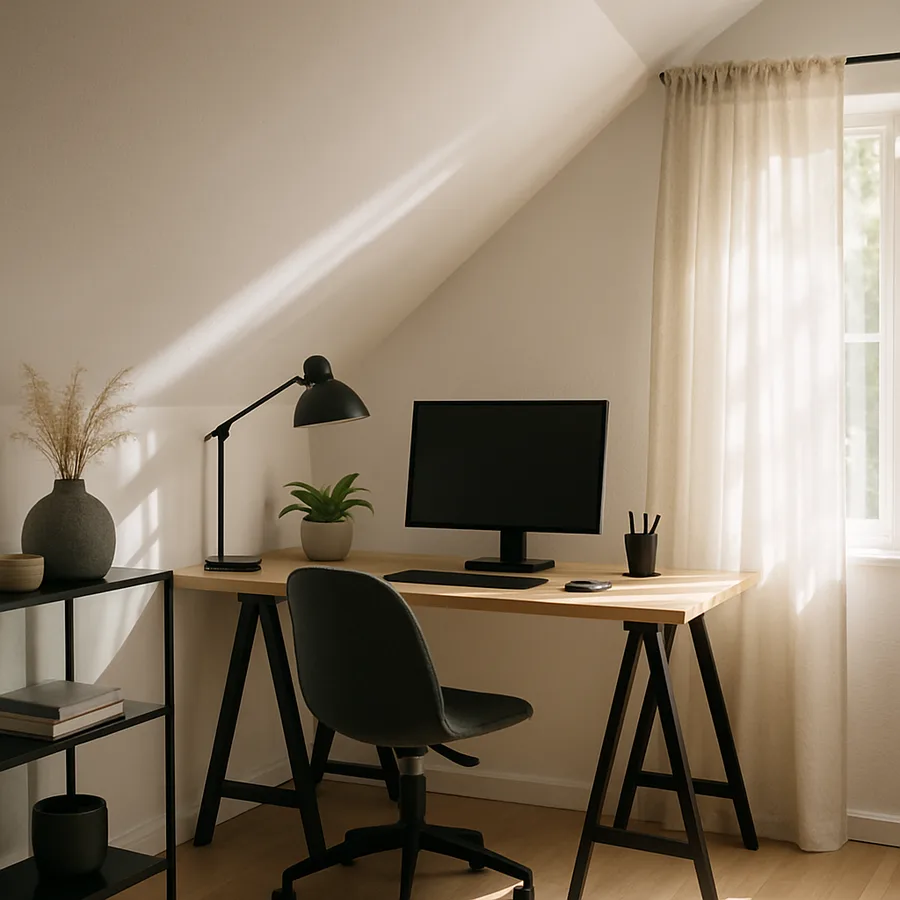
A loft office under a low angled ceiling can be either the most focused workspace in your home or the most frustrating. The difference almost always comes down to how well the design respects the geometry. Where a typical office asks you to fill a rectangular box with furniture, a loft workspace asks you to negotiate with slopes, dormers, rafters, and the sudden drop from standing height to crawl zone. Handled well, that negotiation produces a room that quiets the mind, encourages flow, and frames daylight in ways a basement or spare bedroom never could.
Remote and hybrid work continue to drive demand for dedicated home offices. A 2024 American Institute of Architects (AIA) Home Design Trends Survey reported that 68% of residential architects saw increased requests for dedicated home office spaces, and the U.S. Bureau of Labor Statistics has noted that roughly 35% of employed adults worked from home at least part of the week in recent years. That demand has collided with finite square footage in most homes, which is why so many homeowners are turning their upper-floor lofts and attic dormers into serious workspaces rather than storage graveyards.
Start With a Functional Zoning Plan
A loft is rarely a single-purpose room. It usually handles a mix of concentration, video calls, reference storage, and occasional guest overflow, all under a ceiling that changes height every few feet. The most effective first step is zoning the room by ceiling elevation. Designate the tallest band under the ridge as your primary work zone, the mid-height area for seated tasks like reading or sketching, and the lowest band, typically under 4 feet, for filing cabinets, printers, and archival boxes that never need to be stood over.
Sketch a quick floor plan and mark three ceiling-height zones on it. Ask yourself a simple but revealing question: where will I be sitting or standing during 80% of my workday? That zone gets your desk and monitor. The remaining 20%, the low, awkward edges, should disappear into cabinetry or become intentionally cozy nooks for calls that benefit from a softer setting. When the layout follows the room rather than fighting it, everything feels larger and calmer.
Desk Placement: Dormers, Gables, and the Ridge
The three classic desk placements in a low-angled loft are the dormer desk, the gable desk, and the ridge-parallel desk. A dormer desk slides directly under a dormer window, which gives you a pool of standing headroom, generous daylight, and a natural frame around the monitor. It is often the most photogenic arrangement and the easiest to execute because the dormer already breaks up the slope.
A gable desk sits against the short vertical wall at the narrow end of the loft, which offers full standing clearance and a clean backdrop for video calls. This is the preferred option when your loft has limited dormer real estate or when you need the visual authority of a tall wall behind your camera. A ridge-parallel desk runs the length of the room directly beneath the peak, giving you maximum headroom along the entire work surface but requiring careful attention to monitor sightlines and glare from skylights above.
Whatever placement you pick, the single most important measurement is the clearance behind your chair. You need at least 36 inches of unobstructed space to roll back, stand, and stretch without knocking your head on a slope. The American Society of Interior Designers (ASID) workplace guidelines suggest 42 inches as the comfort minimum for focus rooms, and experienced loft designers will tell you that those extra 6 inches prevent countless headaches over a 2,000-hour work year.
Ergonomics When the Ceiling Fights You
Ergonomics in a low-angled space demands a few non-obvious adjustments. Standard office advice assumes an 8-foot ceiling and plenty of room above the monitor, but a loft may give you only 6 feet 6 inches of clearance directly over your desk. That means the top of your monitor must sit lower relative to your eyes than in a conventional office, and posture drift becomes a real risk over long sessions. The Occupational Safety and Health Administration (OSHA) publishes ergonomic guidance that recommends the top of the primary monitor sit roughly 2 to 3 inches below eye level for a neutral neck position.
Combat the tendency to slouch by specifying a fully adjustable chair with lumbar support, a monitor arm that decouples screen height from desk height, and an adjustable-height desk when the budget allows. If you cannot fit a sit-stand desk under your slope, consider a separate standing work perch in the tallest corner of the room, even if it is just a narrow ledge with room for a laptop. Breaking up seated hours with 5-minute standing sprints is one of the highest-leverage habits in any home office, loft or not.
Have you tested a full workday at your intended desk position before committing to built-ins? A single Saturday spent working from a borrowed folding table in the exact spot where your future desk will live is worth more than any number of floor plans. Real posture problems reveal themselves around hour four, not hour one.
Keyboard height and wrist angle matter as much as monitor height, and they are often the first thing to go wrong under a slope. A desk that is too deep forces you to hunch forward to reach the keyboard, and a desk that is too shallow pushes the monitor uncomfortably close to your eyes. The sweet spot for a loft desk is typically 28 to 32 inches deep and 60 to 72 inches wide, with the monitor pulled to the back edge on an arm and the keyboard tray at seated elbow height. An external keyboard and mouse are essential here, because laptop-on-lap ergonomics are borderline hostile over full workdays.
Footrests are another underrated fix. When your chair height is set correctly for the keyboard, your feet may not reach the floor, which compresses the lower back and starves circulation. A simple wooden or adjustable metal footrest solves it in minutes. Every good ergonomic setup, whether in a corporate office or a converted loft, pays attention to the whole chain from feet to eyes, and the loft ceiling does not change that fundamental truth.
Daylight, Task Light, and Screen Glare
Lofts are often daylight-rich but glare-prone. A skylight directly above the desk can flood the screen with reflections, while a west-facing dormer can backlight your face on every afternoon video call. Plan for glare before you plan for ambiance. Position monitors perpendicular to the primary window rather than facing or backing it, and specify diffusing window treatments such as honeycomb cellular shades or light-filtering roller blinds. The DOE notes that cellular shades can reduce solar heat gain through windows by up to 60% while still admitting soft daylight.
Layer task lighting deliberately. A clamp-on LED task lamp with a 3,000K to 4,000K color temperature gives you neutral, shadow-free light for paperwork and video calls. Add a low ambient floor lamp in the darkest corner, and if your loft has recessed ceiling fixtures, choose airtight, insulation-contact-rated housings with ENERGY STAR certification to preserve the thermal envelope of the roof assembly above.
Acoustics Under a Slope
Sloped ceilings behave strangely for sound. Hard, angled surfaces tend to focus reflections toward specific points in the room, and many loft offices suffer from a faint echo that undermines microphone audio on calls. The fix is a combination of absorption and diffusion. Hang a large framed acoustic panel or a textile tapestry on the gable wall behind your camera, install an area rug that covers at least 60% of the floor, and upholster any bench or daybed in the room with a dense, woven fabric rather than leather or vinyl.
For serious audio work or frequent client calls, consider mounting slim acoustic panels along the underside of the slope itself. Manufacturers such as Armstrong and Rockfon offer residential-grade panels that mount with concealed clips and come in matte, paintable finishes. A handful of well-placed panels can drop the room's reverb time from a distracting 0.8 seconds to a crisp 0.4 seconds, which is close to studio conditions. The International WELL Building Institute cites sub-0.5 second reverb as a benchmark for comfortable speech intelligibility in small focus rooms.
Cable Management and Storage That Vanishes
A loft office lives or dies by its ability to hide clutter. Cable runs are especially tricky because the walls are thin and the rafters are often shallow, which limits in-wall routing. The cleanest solution is to plan a single cable trench along the back of the desk, concealed by a removable wood or metal cover, and run everything, power, network, monitor cables, to a small enclosed cabinet under the desk. A low-profile surge protector with USB-C outputs keeps the cabinet tidy, and labeled Velcro ties prevent the cable tangle that strangles every unmaintained desk eventually.
For storage, reach for tall, narrow bookcases along the gable wall where ceiling height allows, and use the kneewall cavities for drawer banks and pull-out file carts. Open shelving reads light and airy but creates visual noise in video calls, so mix one or two sections of closed cabinets into the composition. Label everything, because a loft office is the kind of room where a single misplaced binder can swallow an afternoon of searching.
Think about power capacity while you are at it. Older lofts often have a single 15-amp circuit serving the entire floor, which is plenty for a bedside lamp but insufficient for a modern office with a workstation, multiple monitors, a printer, a mini-split head, and occasional space heaters. An electrician should confirm the circuit load and usually add at least one dedicated 20-amp circuit for the office zone. Code-compliant grounding and tamper-resistant receptacles are required in most jurisdictions for any new habitable room, and the NEC guidance that local codes adopt spells out the receptacle spacing rules clearly.
Finally, plan for the inevitable gear upgrade cycle. A cabinet built for today's desktop may not fit next year's AI workstation, and a cable chase sized for a single monitor cable may not handle a future dock, webcam, and external audio interface. Oversize the cable trench by 50%, leave one empty conduit between the desk cabinet and the baseboard, and install blank wall plates where future outlets might land. Tiny acts of foresight like these make the room feel generous for a decade rather than cramped within a year.
Conclusion
A loft office is a small commitment with outsized returns when the design treats the sloped ceiling as a feature rather than a flaw. The awkward corners become filing archives, the dormers become daylight frames for monitors, and the tall ridge becomes a breathing zone for the chair roll and the occasional stretch. Working from that kind of room feels qualitatively different from working in a converted guest bedroom, because every sightline and every surface has been chosen on purpose.
The practical path is a sequence of five honest conversations with yourself. Where does your ceiling cross 7 feet, and where does it cross 5? Where will you actually sit 80% of the day? Which window will throw the worst glare, and how will you tame it? Where will the cables go, and where will the clutter hide? When those answers are clear on paper, the build becomes a straightforward execution rather than a series of improvisations. AIA member architects routinely note that loft projects fail more often from vague intent than from tight budgets.
Make it real this weekend. Tape the outline of your future desk on the loft floor with painter's tape, sit in a folding chair inside that outline for two hours, and pay attention to what your neck, your eyes, and your attention actually do. The room will tell you what it needs. Then plan the lighting and acoustics with professional help, because those two systems are the ones most often underestimated by amateur designers and most transformative when done well.
Take the next step today. Draft a simple one-page plan that names your zones, your desk placement, your lighting layers, and your acoustic treatments, and share it with a qualified contractor or interior designer for a second opinion. For further reading, consult the OSHA Computer Workstations eTool, explore AIA resources on residential design, and browse certified lighting options at the ENERGY STAR product finder. Your best workdays may be waiting under that slope.
More Articles You May Like



Comments
Post a Comment