USB Outlet Receptacles in Kitchens and Bedrooms Worth Adding
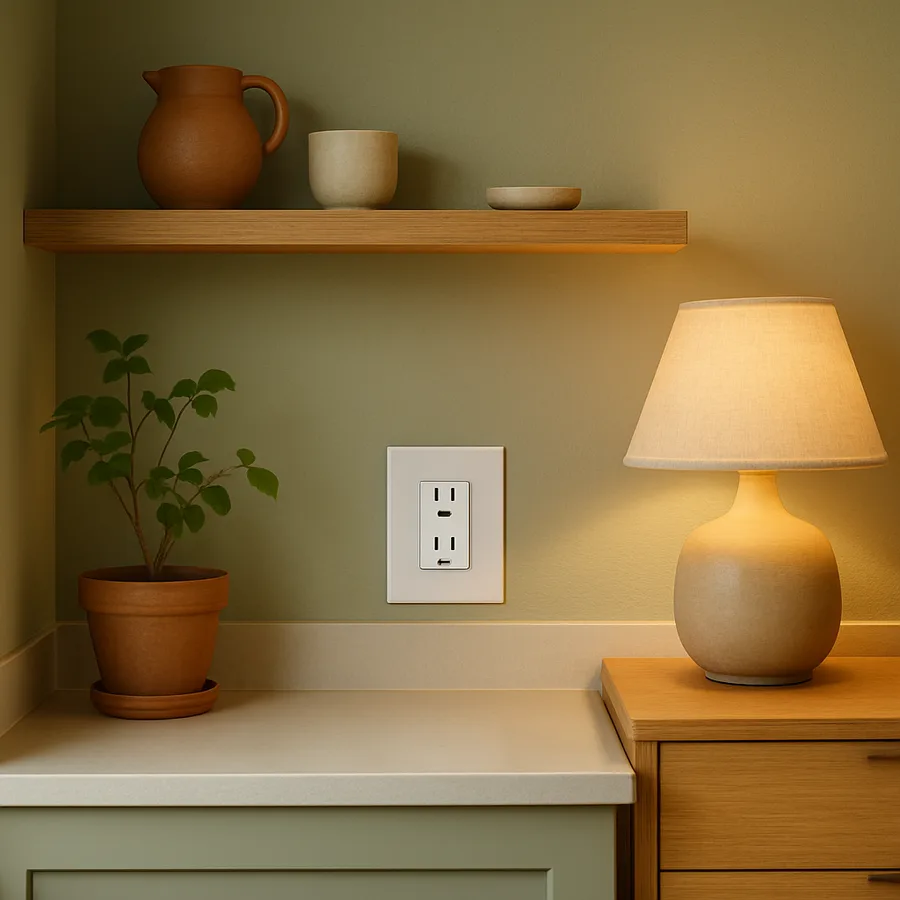
The Case for Built-In USB Power at Home
Every household now runs on a collection of devices that charge through USB cables, from phones and tablets to kitchen scales, electric toothbrushes, and bedside reading lights. The traditional solution of plugging a USB adapter into a standard outlet works, but it consumes one of your two outlet slots and adds a bulky plastic block that protrudes from the wall. Built-in USB outlet receptacles eliminate that adapter entirely by embedding USB-A or USB-C ports directly into the wall plate alongside standard three-prong outlets. The result is a cleaner wall, more available outlet space, and a permanent charging station exactly where you need it.
The Consumer Technology Association (CTA) reported that the average American household contained more than twenty-five connected devices as of their most recent annual survey. That number continues to climb as everyday objects, from picture frames to pepper grinders, gain rechargeable batteries. The demand for USB power has shifted from a tech-enthusiast convenience to a basic household utility, much like how three-prong outlets replaced two-prong outlets decades ago. Installing USB receptacles is not about chasing a trend; it is about matching your home's infrastructure to the actual devices you use every day.
Cost is often the first objection homeowners raise, but the economics are straightforward. A quality USB outlet receptacle costs between fifteen and thirty-five dollars at retail, and a licensed electrician can swap one out in roughly fifteen minutes per outlet at standard labor rates. Compared to the cost of buying multiple USB adapters that eventually break or get lost, and the annoyance of never having one where you need it, the installed outlet pays for itself quickly in both convenience and tidiness. For anyone comfortable with basic electrical work and who understands how to shut off a breaker, some of these are suitable for DIY installation, though local codes should always be checked first.
The National Kitchen and Bath Association (NKBA) has noted a steady increase in client requests for integrated charging solutions in both kitchen and bedroom remodels. Designers are now specifying USB outlets as a default rather than an upgrade in new construction plans. This shift reflects a broader understanding that power accessibility is as much a part of room design as lighting placement or cabinet hardware. Have you counted how many USB adapters are currently plugged into outlets around your home?
USB-A Versus USB-C: Which Ports to Install
The distinction between USB-A and USB-C ports matters significantly when choosing outlet receptacles, because making the wrong choice today could mean replacing the outlets again in a few years. USB-A is the rectangular port that has been standard for two decades, and it still works with a huge number of devices. USB-C is the smaller, oval, reversible connector that has become the default for new phones, tablets, laptops, and increasingly for kitchen appliances and personal care devices. The direction of the industry is clearly toward USB-C, with USB-A gradually being phased out of new products.
For new installations, the strongest recommendation is to choose receptacles that include at least one USB-C port with Power Delivery (PD) support. Power Delivery is a charging protocol that allows the port to deliver higher wattage, typically up to 30 watts in residential outlet models, which is enough to charge a phone at full speed or even power a tablet. Standard USB-A ports on wall outlets typically deliver only 2.4 amps at 5 volts, or about 12 watts, which charges phones slowly by current standards. A receptacle with one USB-C PD port and one USB-A port offers the best short-term compatibility while being future-ready.
Some receptacles offer dual USB-C ports with no USB-A at all. This configuration makes sense in locations where the devices you charge are all modern, such as a bedside table where you charge only a recent-model phone and wireless earbuds. However, in a kitchen where you might charge a wider variety of devices including older ones, keeping one USB-A port available provides useful backward compatibility. The small additional cost of a hybrid receptacle is worthwhile insurance against the device you forgot needs the older connector.
Wattage labeling on USB outlet receptacles can be confusing because manufacturers sometimes advertise total combined wattage rather than per-port output. A receptacle labeled "30W" might deliver 30 watts to a single device when only one port is in use, but split that to 15 watts each when both ports are occupied simultaneously. Reading the specifications carefully and looking for per-port wattage ratings ensures you understand what each connected device will actually receive. The National Kitchen and Bath Association recommends that designers specify per-port ratings in project documentation to avoid client confusion after installation.
Best Placement Spots in the Kitchen
The kitchen presents unique opportunities and constraints for USB outlet placement. The most valuable location is the countertop backsplash zone, where outlets are already required by electrical code at regular intervals. Replacing one or two of these standard outlets with USB-equipped versions puts charging power exactly where you set down a phone or prop up a tablet to follow a recipe. Since these outlets are already wired and accessible, the swap is straightforward for an electrician and typically does not require any new wiring.
A second high-value kitchen location is near the breakfast nook or kitchen desk area, if your layout includes one. Many families use this spot as a homework station, a bill-paying area, or a place to manage the household calendar on a tablet. Having USB power built into the nearest outlet means laptops and tablets can charge without an adapter cluttering the small workspace. If the desk area has a drawer nearby, a USB outlet there can even support a concealed charging drawer where devices charge out of sight.
The area near the kitchen island is worth considering if your island has an electrical outlet, which modern code increasingly requires. Island outlets often sit on the side panel or in a pop-up housing on the countertop surface. Adding USB capability to an island outlet is especially useful because the island is frequently where people gather and set down their phones. According to Houzz kitchen survey data, the island has become the most-used surface in American kitchens, surpassing both the main countertop and the dining table for casual daily use.
One placement to avoid in the kitchen is directly adjacent to the sink or dishwasher, not because of the USB ports specifically, but because any outlet in this zone is subject to moisture exposure and is governed by GFCI protection requirements. USB outlet receptacles are available in GFCI-protected versions, but they are more expensive and bulkier. A more practical approach is to place USB outlets one position away from the wet zone, where they benefit from the GFCI protection of the upstream outlet without needing their own GFCI mechanism. Always confirm placement with a licensed electrician who understands your local jurisdiction's requirements.
Strategic Bedroom Locations That Reduce Clutter
The bedroom is where USB outlets deliver perhaps their greatest quality-of-life improvement, because the bedside charging station is one of the most cluttered spots in any home. A USB outlet installed behind or beside the nightstand eliminates the adapter block that takes up one of your two outlet slots, frees that slot for a lamp or white noise machine, and provides a cleaner cable path from wall to device. For couples, having USB ports on both sides of the bed means neither person needs to stretch a cable across the mattress or argue over the single available adapter.
The dresser or vanity area is another strong candidate, particularly if this is where personal care devices charge. Electric shavers, facial cleansing brushes, smartwatches, and wireless earbuds all use USB charging and tend to accumulate on dresser tops in a tangle of cables and adapters. A USB outlet at dresser height, or even slightly below the top surface so cables route down and back up onto the dresser, keeps the charging functional but far less visually chaotic. The goal is to design a space where devices charge without the charging infrastructure dominating the room's appearance.
For bedrooms that double as home offices or study spaces, a USB outlet at the desk is essential rather than optional. The desk area typically needs to power a laptop, charge a phone, and possibly run a desk lamp or monitor, which quickly overwhelms a standard two-outlet receptacle. A USB-equipped outlet at desk height provides dedicated device charging without consuming the standard outlets you need for higher-wattage equipment. If the desk faces a wall, installing the outlet at the height of the desk surface rather than at the standard low-wall position reduces visible cable length dramatically.
Do not overlook the closet or dressing area as a potential USB outlet location, especially in walk-in closets where you might charge a flashlight, a lint remover, or a garment steamer. These are low-priority compared to bedside and desk locations, but if you are already doing electrical work in the room, adding one USB outlet in the closet costs very little incrementally and solves a small daily annoyance. The principle throughout is to think about where devices actually live and charge in your daily routine, then bring the power to those exact spots.
Safety, Code Compliance, and Product Quality
Electrical safety is non-negotiable when installing any outlet receptacle, and USB models are no exception. Every USB outlet receptacle you purchase should carry a UL (Underwriters Laboratories) listing, which certifies that the product has been tested for electrical safety, heat generation, and fire resistance. Unlisted products imported through discount marketplaces may save a few dollars but lack the safety testing that protects your home. The National Electrical Manufacturers Association (NEMA) maintains standards for residential outlet devices, and UL certification confirms compliance with those standards.
Heat generation is the primary safety concern specific to USB outlet receptacles. The internal circuitry that converts your home's 120-volt AC power to the 5-volt or higher DC power that USB devices require generates heat, and that heat must dissipate safely within the wall box. Quality receptacles are designed with thermal management in mind, but overloading a receptacle by charging multiple high-draw devices simultaneously in a small, poorly ventilated wall box can cause excessive warmth. If a receptacle feels noticeably hot to the touch during normal use, discontinue use and consult an electrician, as this may indicate a defective unit or an installation issue.
Local building codes govern where and how outlets can be installed, and USB receptacles must meet the same code requirements as standard outlets in terms of box fill, wire gauge, circuit loading, and GFCI/AFCI protection. In kitchens, all countertop outlets must be on GFCI-protected circuits, which applies equally to USB-equipped outlets. In bedrooms, many jurisdictions now require AFCI (Arc Fault Circuit Interrupter) protection on all outlets, and the USB receptacle must be compatible with the AFCI breaker on that circuit. A licensed electrician will ensure compliance, and this is one area where cutting corners to save on labor costs is genuinely risky.
Product longevity varies considerably across brands. The USB charging standards and connector types evolve faster than the outlet receptacles themselves, which are designed to last decades in the wall. Choosing a reputable electrical brand such as Leviton, Legrand, or Eaton improves the likelihood that the product will perform reliably for years. The cost difference between a fifteen-dollar no-name receptacle and a twenty-five-dollar branded one is trivial relative to the installation labor and the importance of the device working safely and consistently over time. Investing in quality at the component level is always the right decision for permanent electrical installations.
Making the Decision: Which Outlets to Upgrade First
With limited budget and time, prioritizing which outlets to upgrade first is a practical necessity for most homeowners. The highest-impact starting point is nearly always the two bedside outlets in the primary bedroom, because these are used daily by every household and the improvement is felt immediately every morning and evening. The second priority is typically the kitchen countertop outlet closest to where phones and tablets are set down during cooking and meal preparation. These four to six outlets cover the locations where USB charging happens most frequently in the majority of homes.
After the high-priority spots, consider outlets in common gathering areas such as the living room end table location or a family room media console area. These locations serve guests as well as household members and reduce the common request of "do you have a charger I can borrow?" A USB outlet near the entryway console table or mudroom charging station is also highly practical, providing a place to top off a phone or smartwatch as you come and go. The Better Homes and Gardens home organization guides recommend designating a single drop-zone near the entrance specifically for device charging, and a USB outlet at that location supports this strategy perfectly.
For a whole-home approach, upgrading every outlet in the house is unnecessary and wasteful. Bathrooms, garages, utility rooms, and hallways rarely benefit from USB ports because devices are not routinely charged in those locations. A focused upgrade of eight to twelve outlets in the rooms where you actually use and charge devices delivers nearly all of the benefit at a fraction of the cost. Resist the temptation to over-install; you can always add more later if a particular spot proves to need USB power that you did not initially anticipate.
Is there an outlet in your home that currently has a USB adapter permanently plugged in, reducing it to a single usable socket? That outlet is your most obvious candidate for an immediate upgrade, because the adapter is already telling you that USB power is needed at that exact location. The swap takes minutes for an electrician and eliminates a known daily friction point.
Conclusion: A Small Upgrade With Outsized Daily Impact
USB outlet receptacles sit in a rare category of home improvements that are inexpensive, quick to install, and deliver noticeable quality-of-life benefits from the first day. They remove adapter clutter, free up standard outlet slots for other devices, and place charging power exactly where your daily routine demands it. The technology is mature, the products are safe when properly selected and installed, and the cost is modest enough to fit into any home improvement budget.
The shift from USB-A to USB-C with Power Delivery means that now is actually an ideal time to install or upgrade, because current receptacle models can handle both legacy and modern devices at useful charging speeds. Waiting risks either continuing to deal with adapter clutter or making an upgrade later that could have been done today for the same cost. The electrical infrastructure in your walls should reflect the devices you actually use, and for most households, that means USB power at the bedside, the kitchen counter, and the desk.
Start this week by identifying the three outlets in your home that currently have USB adapters plugged into them, then contact a licensed electrician or visit your local electrical supply store to price out the replacement receptacles. The entire project, from decision to completed installation, can realistically happen within a single weekend. Few home upgrades offer this combination of low effort, low cost, and high daily satisfaction.
As the number of USB-powered devices in homes continues to grow, built-in USB power will transition from a nice-to-have to an expected feature, much like how USB ports in cars went from novelty to standard equipment. Making the upgrade now means your home is already prepared for the next wave of devices, and you get to enjoy the cleaner, more functional spaces in the meantime.
More Articles You May Like



Comments
Post a Comment